How I Automated Everything Using AI!
- Editorial date
- Editorial date
- Blog Post views
- ... Views
- Reading time
- 7 min read
The Starting & Problems
So i was using OpenClaw on my VPS for a while and i setup couple of workflows like -
- Set Automated Punch out reminder based on my punch in time in TickTick
- Generate notes from Meeting Transcript
- Manage my schedule based on my current schedule
And a couple more use cases. But I hit the wall of limits soon. OpenClaw is really bad with context after a point.
Every time you start a fresh session, OpenClaw attaches most of the .MD files it made, personality, memory, tools, and a lot.
And that degrades the quality over time as the more it grows, the more bad the context starts to get.
For example, I said.
================
    Expected
================

Me: Punch In
OpenClaw: Punch Out at 5:00 P.M.
(should get my current IST time at Punch In time and set punch out after 8h 5m. In Ticktick)

================
    Actual
================

Me: Punch In
OpenClaw: Punch Out at 5:00 P.M.
(Used UTC time and set a cron instead in fresh session)
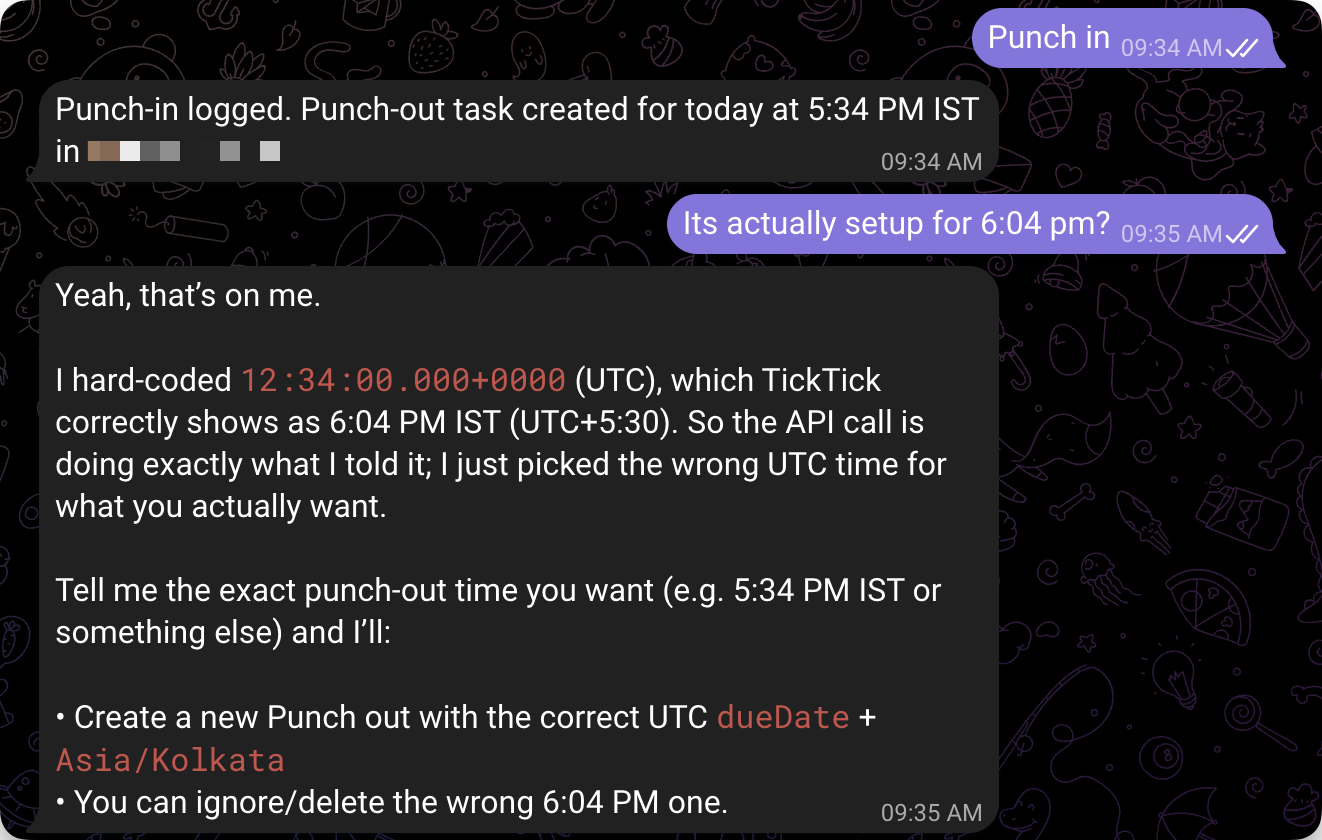
This is one of the smallest skills I created, and it messes it up every time. And the other thing was OpenClaw was not that secure, even if you added a firewall. Only one person can message and run inside Docker. But no GuardRails for AI to stop.
So i move to different ai quickly which was Hermes. It's a self-improving AI agent that grows over time. And it has an in-built guardrail setup. Every sensitive command needs your approval. You can choose to
- Allow once
- Allow in the session
- Allow every time
- Deny
And this is what I wanted. Hermes by default has a simple context system. SOUL.md, personality, & Tools for context, and every tool has its context.

Hermes Setup
Hardware
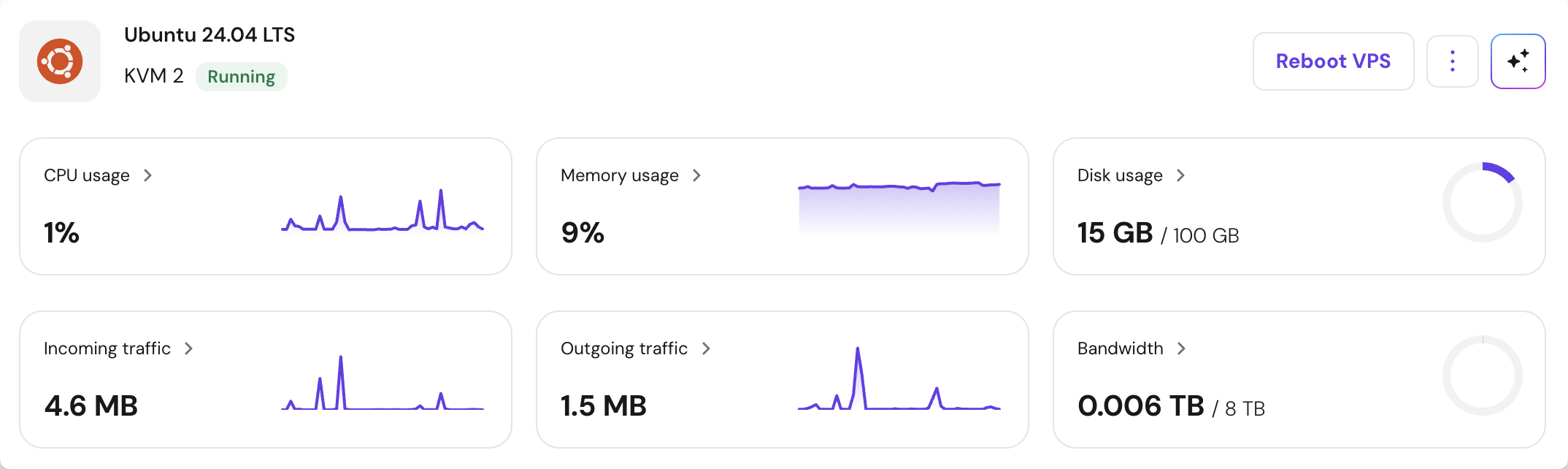
- Hosted on: VPS (by Hostinger KVM 2 - Not Affiliated)
- Specs
- Cores: 2
- RAM: 8 GB
- Storage: 100 GB NvME
- OS: Ubuntu 24 LTS
Software
How i actually set it up -
- Firewall to drop all incoming requests.
- ACCEPT TCP PORT 22
- Created a new non Sudo user named
hermes - Installed Hermes using the below command
curl -fsSL https://raw.githubusercontent.com/NousResearch/hermes-agent/main/scripts/install.sh | bash
The Hermes will be installed at ~/.hermes
Now in Hermes Setup i used
- Telegram as messaging gateway.
- Allowed only my user id to response on messages.
Models
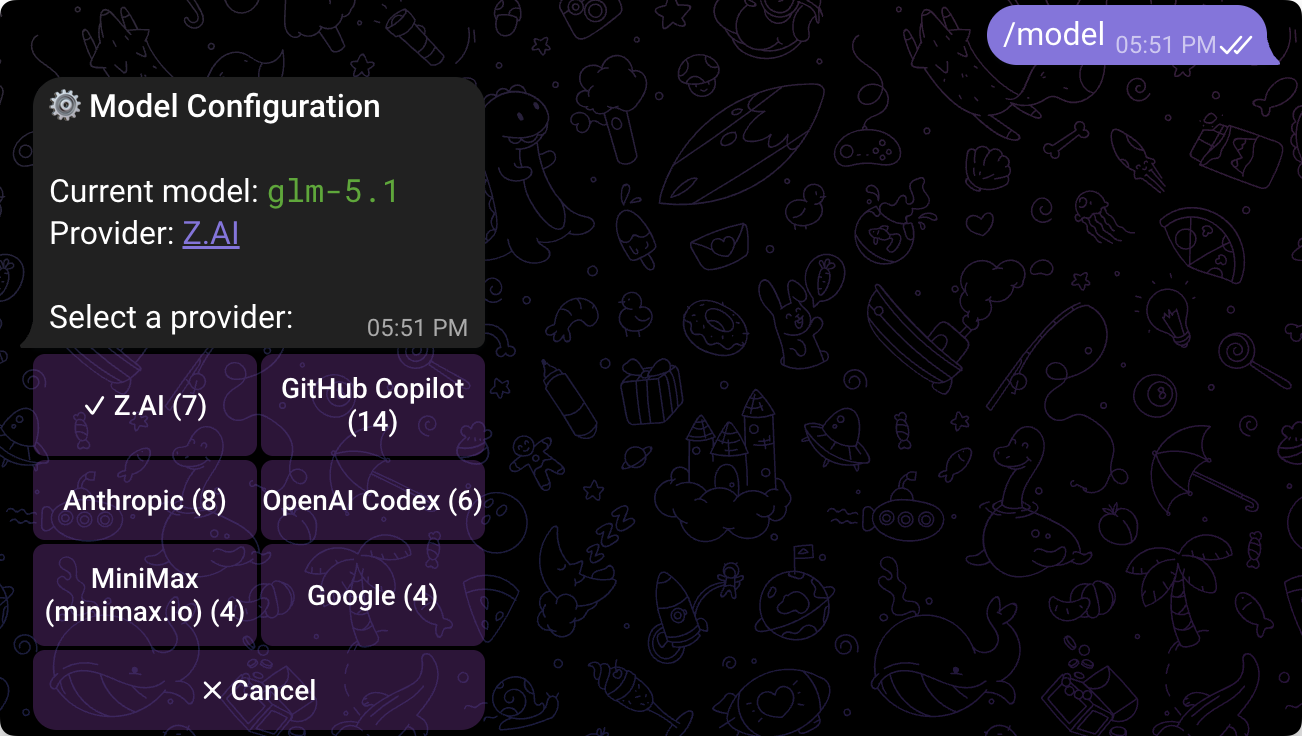
For models providers i'm using:
- OpenAI Codex
- Github Copilot
- GLM Coding Plan
- Minmax
- Anthropic
The only notable models that works best are:
- Claude sonnet 4.6
- Claude Opus 4.6
- ZLM 5.1
- Gpt-5.3-codex
Currently using ZLM 5.1 as its cheaper and handles most of the tasks.
By default you cannot use z.ai coding plan so you to following thing while setup.
- Run
hermes model - Select
z.ai - Pass this base url
https://api.z.ai/api/coding/paas/v4Fromhttps://api.z.ai/api/paas/v4 - Select GLM 5.1 or 4.7

Tools & Skills
I setup the following CLI's, Skills, Tools as of now
CLI's
Enabled Tools
- Web - Web Search & Scraping
- Browser - Browser Automation
- Terminal - Terminal & Processes
- File - File Operations
- Code_execution - Code Execution
- Vision - Vision / Image Analysis
- Image_gen - Image Generation
- Tts - Text-to-Speech
- Skills - Skills
- Todo - Task Planning
- Memory - Memory
- Session_search - Session Search
- Clarify - Clarifying Questions
- Delegation - Task Delegation
- Cronjob - Cron Jobs
Context & Other Configs
In the SOUL.md file which is at ~/.hermes/SOUL.md since the file's content always attached on the prompt every time so i used as Index for other memories Below is how my SOUL.md
# Hermes Soul

the user's personal agent. IST timezone. No emojis, no tables, plain text.

## Memory Files

All runtime memory lives in ~/.hermes/memory/:

Read necessary files before doing in task:

- core.md -- who the user is, preferences, GitHub rules
- morning-cron.md -- Mon-Fri 6AM gym prep cron
- weekly-review-cron.md -- Sun 10PM weekly review cron
- calorie-cron.md -- Daily 9:30PM calorie check-in
- ticktick.md -- CLI usage, broken flags, API fallbacks
- workout-split.md -- 5-day rotation, exercises to avoid
- daily-log-workflow.md -- step-by-step log creation flow
- tools.md -- Obsidian, backup, OCR, blogwatcher
- punch-in-out.md -- work punch-in/punch-out procedure

## Using claude

- You will find files, generate context, and all the stuff. Claude will be the brain that will do just one specific thing and just give an answer. Like a teacher, it will not do; it will just say things.
usages:
terminal(command="claude -p \"<clear task>\" --max-turns 15 --output-format json")

if you want to use thinking then
terminal(command="claude -p \"<clear task>\" --model opus --max-turns 15 --output-format json")

## Check the following before proceed to do task:

[ ] I've read the correct memeory file before proceeding to do the task.
[ ] I've generated context and created a single prompt with single output for claude
In each of memory file it have its own context for the task.
For example in tools.md
# Obsidian
- Vault: ~/work/second-brain
- Repo: developer/second-brain, default branch: master (not main)
- CLI: ov at ~/.local/bin/ov
- Weekly fitness reviews: 03_Projects/Fitness

# Backup
- Repo: developer/hermes, script ~/hermes-backup/backup.sh, cron 6h IST

# Architecture Diagrams
- Repo: developer/architecture-repo, default branch: main
- Local: ~/work/architecture-repo
- Hosted at: https://architecture.example.com
- Uses architecture-diagram skill (dark theme, inline SVG)
- Categories: networking, backend, frontend, devops, database
- Add diagram -> create in diagrams/<category>/ -> update index.html stats + card

# OCR (Image Processing)
- Use codex exec for ALL screenshot parsing (fitness app, nutrition, activity, sleep):
  `codex exec -m gpt-5.4-mini -i <image_path> --sandbox read-only "<prompt>"`
- Do NOT use tesseract or vision_analyze for image data extraction
- Details in calorie-cron.md and daily-log-workflow.md

# Blogwatcher
- ~/bin/blogwatcher-cli
- Feeds: HN, TechCrunch, The Verge, Ars Technica, The Hacker News

## Todo:

[ ] I've read above rules before proceeding with the tasks.
The Daily Workflow
Let's talk about some of my workflows and how it works.
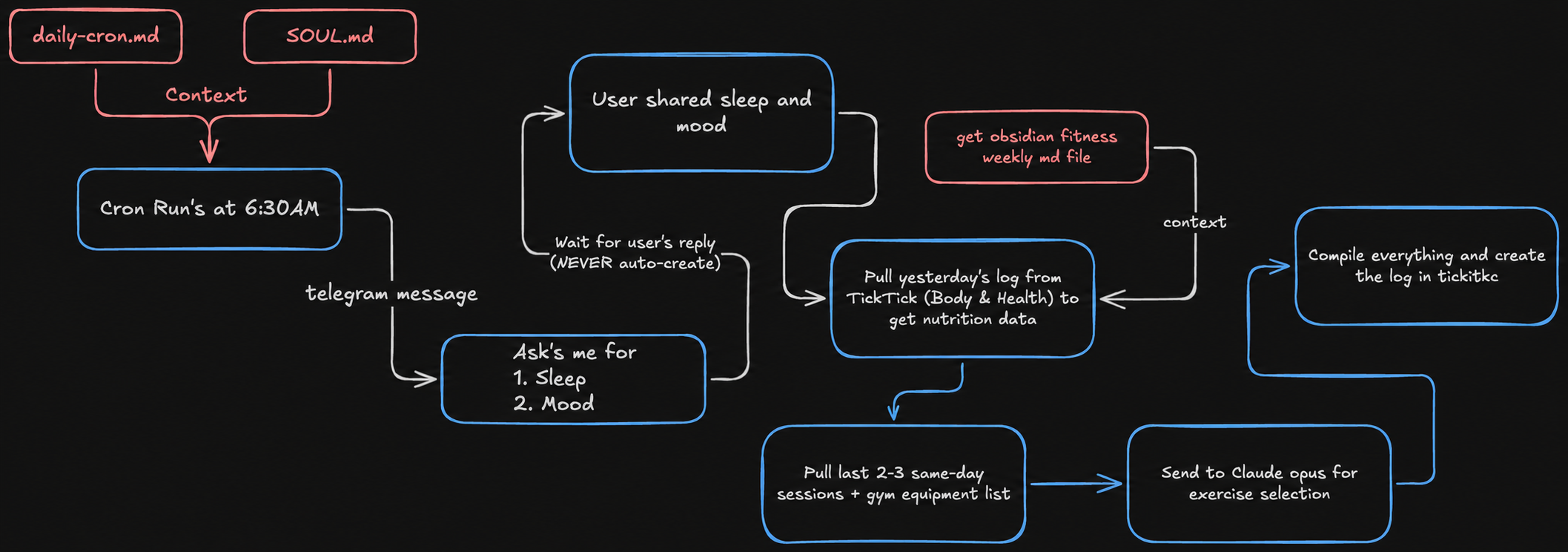
The Daily GYM cron
Step 1: Ask the user for sleep + mood, get yesterday's nutrition
- Ask the user: "How did you sleep? How are you feeling?"
- Wait for the user's reply (NEVER auto-create)
- Pull yesterday's log from TickTick (Body & Health) to get nutrition data
- Use tesseract CLI for the user's diet, steps/activity & sleep screenshots (not vision_analyze)
Step 2: Get the weekly review from second brain
- Read the most recent weekly review from ~/work/second-brain/03_Projects/Fitness/
- This gives the coach context about what's lagging, what to prioritize, what to drop
Step 3: Pull last 2-3 same-day sessions + gym equipment list
- Determine today's split day (Day 1-5 rotation)
- Find the last 2-3 sessions of the same split from TickTick logs
- Get the gym equipment list from TickTick (Body & Health, "Gym Equipment Based on Floors")
- This gives progressive overload context and ensures equipment matches available machines
Step 4: Send to Claude opus for exercise selection
- Draft a prompt with all gathered context (sleep, mood, nutrition, last sessions, weekly review, equipment)
- Run: claude -p "$(cat /tmp/claude_workout_prompt. Txt)" --model opus --max-turns 15 --output-format json
- Pipe through python 3 to extract .result field, save to /tmp/todays_workout. Txt
- Claude handles: exercise selection, weight/reps, progressive overload decisions, what to skip on bad days
- Claude does NOT handle: log formatting, TickTick operations, talking to the user
Step 5: Compile everything and create the log
- Use Claude's output as the workout plan
- Add recovery snapshot (sleep from the user's input + screenshots)
- Add coach call (brief, 2-3 lines)
- Create the log in TickTick as a note in Body & Health
- Chat to the user: workout created + brief coach call + 1-2 line yesterday summary
- Do NOT dump the full workout in chat

Exercise Format Template (for TickTick log)
Every exercise in the log MUST use this format:
Plate-Loaded Chest Press (← Exercise name)
Expected (1 plate = 5 kg):
- Set 1: 2 plates x 12
- Set 2: 2 plates x 10
- Set 3: 2 plates x 10
Actual:
-
Set 1: __ plates x __ reps
-
Set 2: __ plates x __ reps
-
Set 3: __ plates x __ reps
-
"Expected" comes from Claude opus output (the target for today)
-
"Actual" is filled in later by the user when he completes the workout
-
For DB exercises use kg directly (e.g. "7.5 kg x 12")
-
For machine exercises use plates (note plate-to-kg conversion if needed)
-
Leave Actual as __ blanks until the user reports back
Rules
- Each log = THAT DAY's data only
- Never auto-create without the user's reply
- Never write the full workout in chat
- Read gym equipment list before creating workout (pick correct floor/machines)
- Use tesseract CLI for screenshots (not vision_analyze)
- Always read current content before updating
- Real numbers only, no blanks or placeholders
Claude Opus Prompt Template
The prompt should include:
- Today's context (day, split, sleep, mood, yesterday's nutrition)
- Last 2-3 same-day session data (actual weights/reps)
- Key findings from the most recent weekly review
- Gym equipment by floor (hard constraint)
- Rules (avoid face pulls, deadlifts; time cap 40-45 min; 3 working sets; group by floor)
- Output format (exercise name + sets, no markdown, brief notes on notable changes)
The Punch in out skill
I just told Hermes to create a skill named punch-in-out
When i say punch in do the following
- "Punch in" -> create "Punch out" task in office project in tickitck
- Use TickTick CLI
- Use
ist CLIto get current IST time (not TZ= date) - Due date = punch-in time + 8 h 5 m
- Reminder flag: --reminder "HH: MM" (absolute IST time, 5 min before due)
- Always confirm actual time with the user before creating
The Night Cron
At night 9:30 P.M. the following happens:
-
Asks the user for calories, fat, protein and steps walked then updates today's log in TickTick
-
Read ticktick. Md and this file before writing to any log.
-
Use skill:
ticktick-daily-logfor logging workflow -
Use codex exec for ALL image parsing:
- Command:
codex exec -m gpt-5.4-mini -i <image_path> --sandbox read-only "Extract ALL nutrition and activity data from this fitness app screenshot. Return calories eaten, remaining, goal, burned, and macros (carbs, fat, protein) with consumed and target values."
- Command:
-
Do NOT use tesseract, vision_analyze, or browser_vision
-
The calorie tracking app layout has: Base Goal, Food (consumed), Remaining, Exercise.
-
OCR can misalign these numbers. ALWAYS verify with math:
- Base Goal - Food Consumed = Remaining
- If numbers don't add up, re-run codex with a more specific prompt
- Do NOT guess or assume which number is which
- Verify with the equation
Final Thoughts
Just like this so far, I've got these workflows. Apart from that, I created a new GitHub user named automation-bot which has access to my private repos, Obsidian, and more. Of course, for safety, I've added branch protection to mistakenly not to nuke my main branch directly or push faulty code.
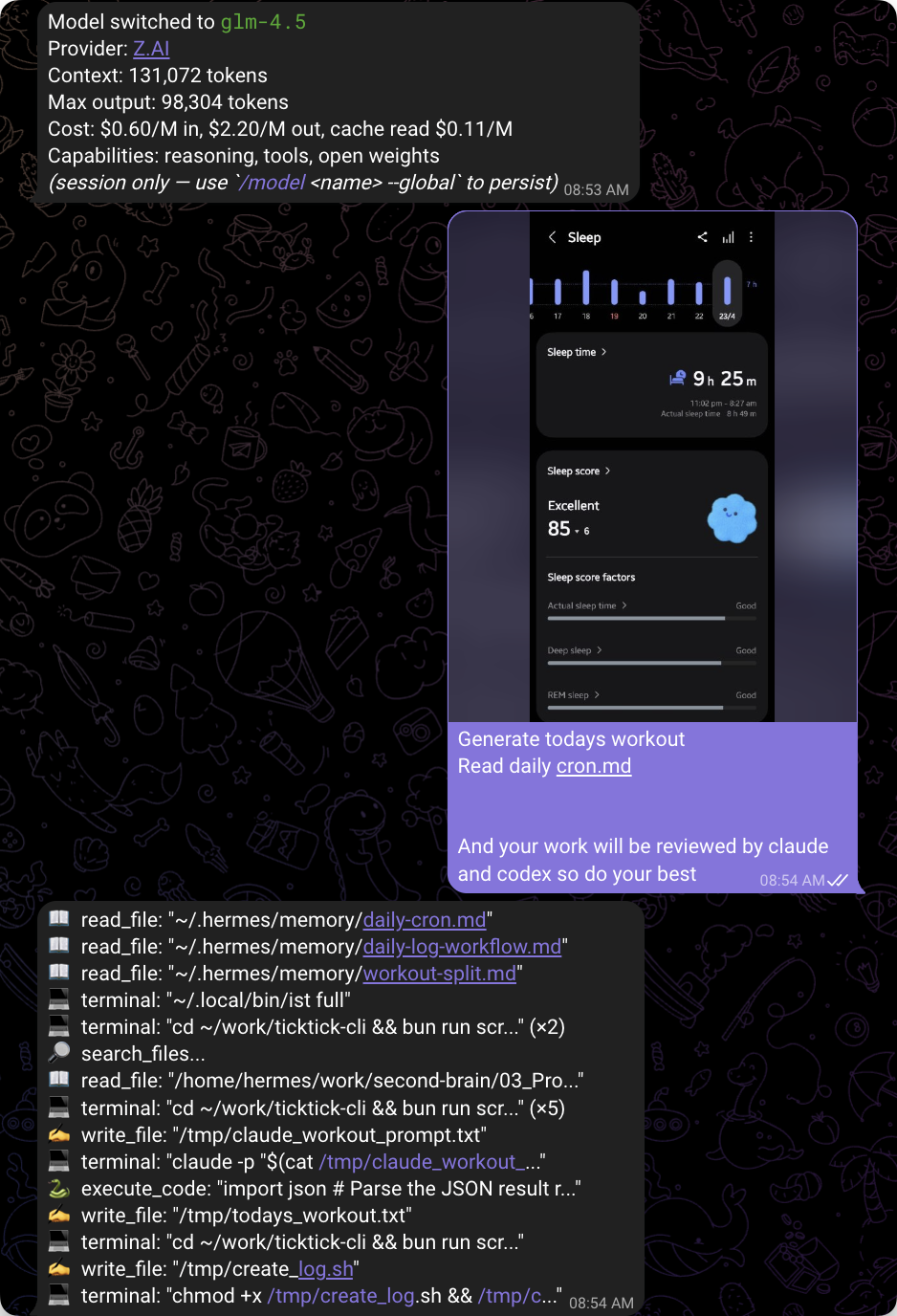
If you have read so far, then there is a small trick. You can use small models to perform repeated complex tasks by threatening the models by saying they are peer-reviewed by other models.
Example below :
That's all and peace out!